
How to Play Anime Dice
A labelled tour of the Update 2 HUD so Shop, Rebirth, and Index stop blending together.
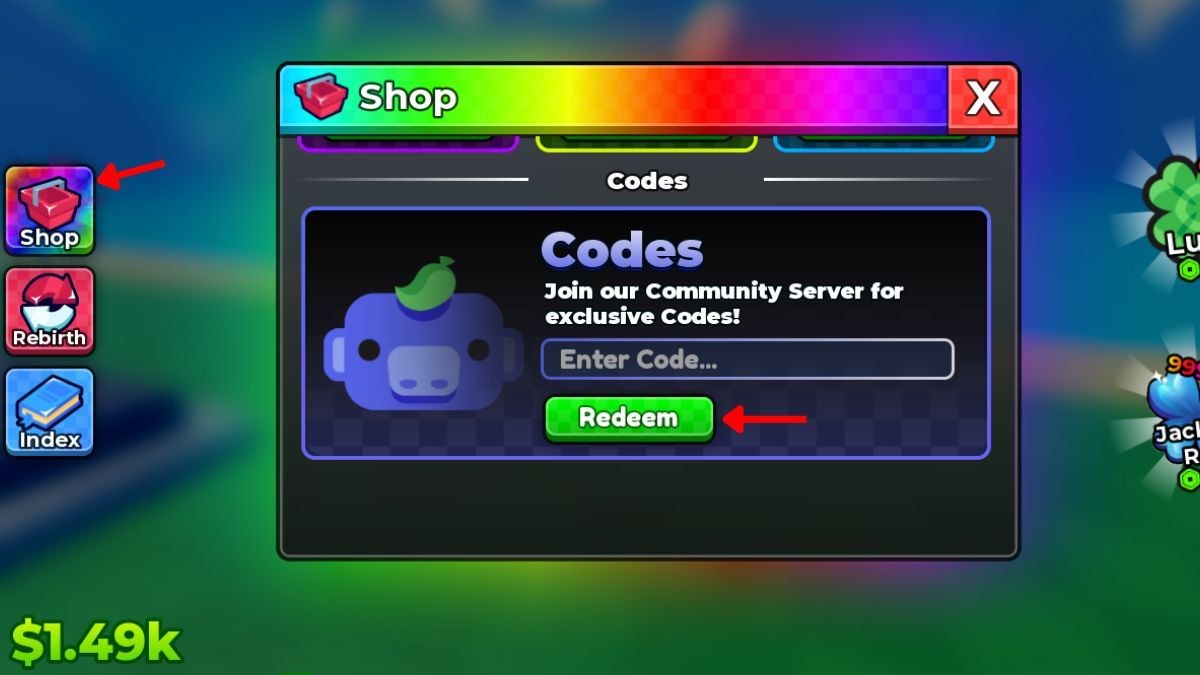
Anime Dice is an incremental Roblox simulator: roll a die, reveal an anime-inspired unit, place it on a pad, collect cash, spend cash on luck, repeat until rebirth. The confusion is never the fantasy — it is the chrome. This page names every persistent control on the Update 2 client. Pair it with getting started for the first-hour order, and with how to make money once the HUD makes sense.
You play on a shared server (max nine) with a personal plot. Other avatars can wander; they cannot take your pads. Cash in the lower-left HUD is yours, including the amount that ticks while you are offline.
Left stack: Shop, Rebirth, Index
Three icons sit on the left edge, top to bottom:
- Shop — gift crate. Opens a rainbow window. The Codes tab is where UPDATE2 lives. Other Shop tabs sell luck products and convenience. Full redemption path: how to redeem.
- Rebirth — circular arrows. Prestige reset. Do not tap it to “refresh codes.” Codes are per Roblox account. When you should tap it: rebirth guide.
- Index — book. Collection log of units you have seen. Rewards for filling it are slow. Walkthrough: index and collection.
If you only remember one thing: codes are inside Shop, not inside Rebirth.
Right stack: Lucky and jackpot-style badges
On the right you will see a clover Lucky badge and a blue burst that reads like a jackpot counter. These are luck-facing products and status chips, not promo fields. Tapping them will not redeem RELEASE. They do matter for the lucky spins loop because they advertise paid or event luck on top of dice nodes.
The die and the pads
Your avatar holds a white six-pip die in the official screenshots because that is the fantasy: every roll can theoretically hit the 1-in-9,342,584 banner. In play, the die is the gacha button. Each roll costs cash (or consumes a Lucky Spin). The unit that appears must be placed on a pedestal to earn. Units left in the cursor or in a holding slot do not print money.
Pads are the rectangular tiles on the tropical floor. Fill them left to right, front to back, whatever your muscle memory is — just do not leave holes. You can pick units up later to move a keeper onto a better pad if the layout has hidden multipliers. If you notice one pad earning more, park the best unit there.
Currencies you will actually touch
- Cash — the
$readout. Buys dice upgrades and unit levels. Generated by placed units, including offline. - Lucky Spins — boosted rolls, usually from codes.
- Trait Rerolls — overwrite a unit passive. Guide: traits and mutations.
- Gems — Grade upgrades. Guide: grades.
Cash is abundant and meant to be spent. The other three are scarce. The upgrade priority tool exists because mixing them up is how plots stall.
Rolling without tilting
Roll in short sessions after a luck purchase, not as an AFK clicker on default dice. When a unit lands, ask three questions: Is it rarer than my worst pad? Is it mutated? Would the tier list keep it? If yes, place and consider Grade. If no, place anyway until the plot is full, then replace.
There is no combat rotation, no skill bar, and no “how to beat” a dungeon. The closest thing to a boss is a dry luck streak, which you beat with dice nodes, Lucky Spins, and a scheduled rebirth — not with a hidden mechanic.
Social and account layer
Like the experience and join the More & More Games group if you want patch pings; the official description asks for both. Discord is linked from official links. Leaderboards are a flex screen for plots that already did the loop correctly. They are not a separate game mode.
If the HUD ever feels like a different game after a patch, check Updates before you assume you forgot a button. Update 2 already changed the client banner; future numbered updates will add more Shop noise.
Once you can open Shop, Rebirth, and Index without hunting, you know how to play. Everything else is economy. Go make the economy work with dice upgrades and the money guide.
Frequently Asked Questions
Quick answers to the most common questions.
Where is the roll button in Anime Dice?
The die is your gacha control on the plot. Cash or a Lucky Spin pays for the roll; placing the unit on a pad starts income.
What do the left three buttons do?
Shop (codes and purchases), Rebirth (prestige), Index (collection). Codes are only inside Shop — see how to redeem.
Is Anime Dice multiplayer?
You share a Roblox server with up to nine players, but plots and cash are personal. It is not a co-op raid.
What is the Lucky clover on the right?
A luck product/status chip, not the promo field. Promo codes stay in Shop. Luck spending is covered in lucky spins.