
Anime Dice Codes Checklist
A repeatable redeem order for mains, alts, and post-patch logins.
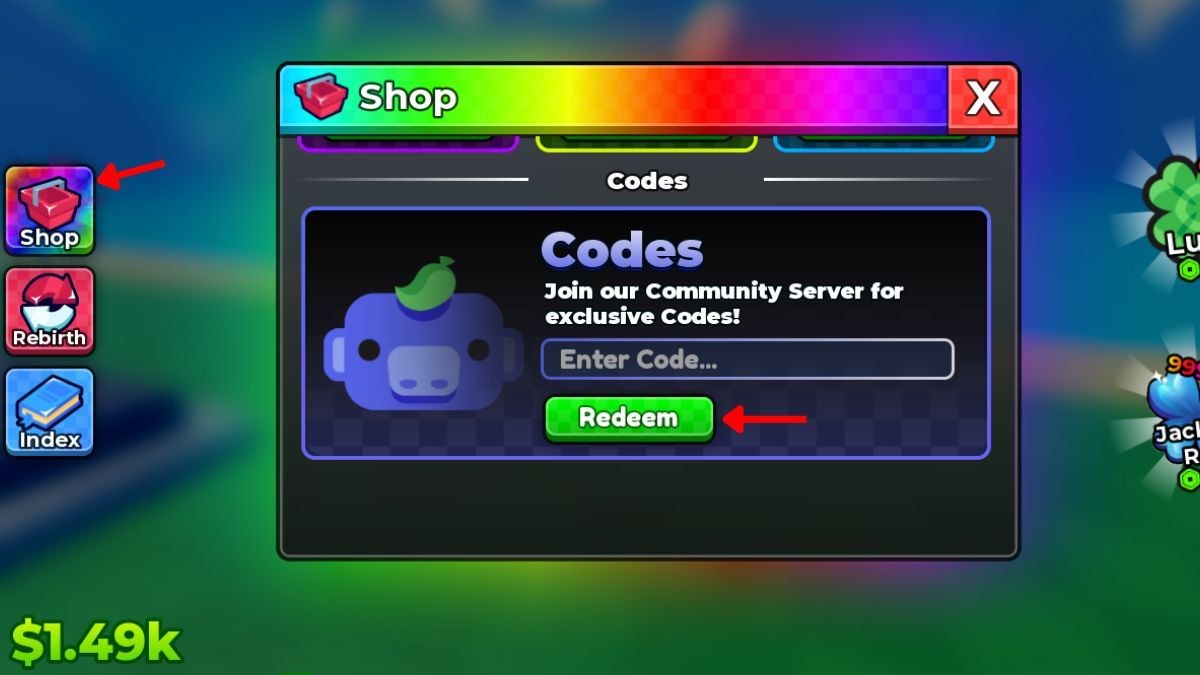
Use this page as a run-of-show. The live reward table stays on the codes hub so we do not maintain two number lists. When a string expires, that hub changes; this checklist only drops the line. Click-by-click UI help: how to redeem. Spend help: code rewards. Sister tool: upgrade priority.
Every login
- Confirm the client banner says UPD 2. If not, rejoin from official links.
- Wait until cash appears in the lower-left HUD so Shop is clickable.
- Open Shop (top-left crate).
- Open the Codes tab (rainbow header, gift crate, red X).
- Paste one string, press Redeem, wait for the popup, then the next string.
- Close Shop and look at Lucky Spin / Trait Reroll / Gem counts before you roll.
Strings to try (September 2026)
Work top to bottom. Skip any that already popped “redeemed.”
- UPDATE2 — newest numbered code.
- UPDATE1 — still listed live after Update 2.
- RELEASE — launch string, easy to forget on alts.
- Discord exclusives, if you have them from the community server. Do not invent strings.
If a box fails, hop server once, then mark it expired only if the codes hub agrees.
After the popups
Do not open Rebirth. Do not mill traits. Run this mini-loop:
- Place units on empty pads.
- Buy one cheap luck-facing dice node if cash allows (dice upgrades).
- Burst Lucky Spins (lucky spins).
- Grade the keeper (grades).
- Trait Reroll only if the keeper’s trait is dead (traits and mutations).
That is the same order as getting started, compressed for people who already know the HUD.
Alt accounts
Each Roblox user gets the three strings once. Rebirth does not refresh them. Run the checklist on the alt before you trade time on the main. Do not share injectors across mains and alts (script safety).
Name the alt something you can search. Note the date you claimed UPDATE2. When Update 3 ships, you will want to know which accounts still need the new string without opening every Shop.
After a numbered patch
- Read the matching updates page — today that is Update 2.
- Add the new code to the top of the checkbox list.
- Run every account you still care about.
- Only then decide whether rebirth gates changed.
What this checklist is not
It is not a scraper. It is not an auto-redeemer. It will not accept your cookie. If a site offers to “check codes” by logging in, close it. Paste into the official Shop only.
When RELEASE finally dies, delete it from your mental list and keep UPDATE-style names at the top. The tool is the habit, not the three words.
Keep a note of the date you last opened Shop on each account. Update 2 landed around 2 September 2026; the next numbered code will arrive the same way. If you only remember to check Discord after a dry luck streak, you will miss the string on the alt that needed it most. Pair this checklist with official links so the invite is one tap away from the redeem box.
Frequently Asked Questions
Quick answers to the most common questions.
In what order should I redeem Anime Dice codes?
Newest first: UPDATE2, then UPDATE1, then RELEASE. Order does not change rewards; it changes whether you forget the launch string.
Do alts need their own checklist run?
Yes. Codes are per Roblox user. Rebirth does not copy them.
What if Redeem fails on all three?
Rejoin a fresh Update 2 server, then compare with the codes hub. If they expired, stop spraying lookalike strings.
Should I spend rewards before the next account?
Spend on the current plot first so you do not lose track of Gem counts. Follow code rewards.