
Anime Dice Shop, Lucky Clover, and Paid Luck
Know which button is Codes, which is a luck product, and what is worth Robux.
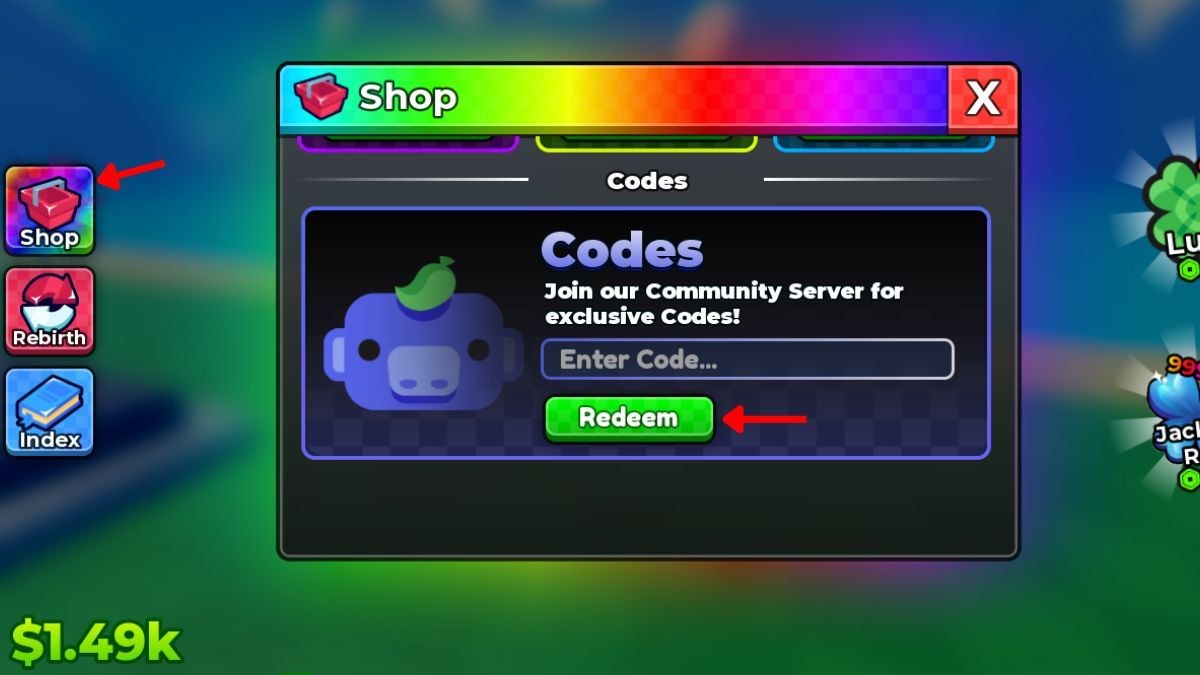
New plots mix up three chrome clusters: the left stack (Shop, Rebirth, Index), the Codes tab inside Shop, and the right-side Lucky clover / jackpot badges. This page labels them so you stop tapping the clover looking for UPDATE2. The click map for promo strings stays on how to redeem. The HUD tour stays on how to play.
Shop is a rainbow window with a gift crate. Codes is one tab inside it. Other tabs sell convenience: extra luck, extra storage, skips. Those purchases are optional acceleration. They are not the core loop. The core loop is pads, dice luck, and rebirth — upgrade priority.
Left stack versus right widgets
- Shop (crate) — Codes live here. So do Robux products. Open it to redeem, then close it.
- Rebirth (loop arrows) — prestige. Not a shop. Rebirth guide.
- Index (book) — collection log. Index.
- Lucky clover (right) — a luck product or status chip. It will not accept RELEASE.
- Blue jackpot-style badge (right) — another luck/status widget, not a promo field.
If the window does not show Enter Code… and a green Redeem, you are not in Codes.
Free luck versus paid luck
Free luck, in order:
- Fill pads so cash exists (offline earnings).
- Buy cheap dice luck nodes (dice upgrades).
- Redeem UPDATE2 / UPDATE1 / RELEASE (codes hub).
- Burst Lucky Spins (lucky spins).
Paid luck is the clover, timed server buffs, and Shop SKUs that skip the wait. They stack with nodes. They do not replace nodes. Buying a luck pack on default dice is the same leak as spinning UPDATE2 too early.
This wiki will not pretend a Robux skip is required. The free loop works. It is slower. Leaderboards are plot cash, not a receipt.
What to buy if you do spend
If you already decided to spend:
- Prefer a luck product you will use in the next ten minutes, after a node, on a full plot.
- Skip cosmetics that change the die skin but not the table.
- Never buy a “private code” from a stranger. Public strings are on the codes hub. Exclusive strings come from Discord on community links, pasted into the same Shop box.
Gamepasses, if your client shows them, are account-bound. Rebirth will not refund them. Read the tooltip. If it does not mention luck, income, pads, or offline, it is flavour.
Shop is also where codes fail
A failed Redeem is a Shop event, not a clover event. Typo, stale server, already claimed, or actually expired (expired codes). Hop servers from the official place, not from a lookalike.
Related pages
Use this page as a legend. Use getting started as the first hour. Use code rewards when the grant lands. Use scripts only if you were about to automate Shop — then read the safety page instead of a loader.
The clover is loud on purpose. Codes are quiet on purpose. Quiet is where UPDATE2 lives.
If you opened Shop to “fix luck” and never filled pads, close Shop. Luck products cannot print cash on empty tiles. Do the offline earnings checklist, then come back. That sequence is the difference between a purchase that stacks and a purchase that funds a screenshot.
Frequently Asked Questions
Quick answers to the most common questions.
Where do I redeem Anime Dice codes?
Shop on the left → Codes tab → Enter Code → Redeem. Not the Lucky clover. Full path: how to redeem.
Is the Lucky clover a code box?
No. It is a luck product or status chip. Promo strings only work inside Shop.
Do I need to buy Robux luck?
No. Dice nodes, codes, and offline earnings are the free loop.
Can Shop sell me UPDATE2 early?
No. UPDATE2 is a promo string on the Update 2 client. Anyone offering it as a paid file is selling fiction.