
How to Redeem Anime Dice Codes
Find Shop, paste UPDATE2, and claim Lucky Spins without missing the Codes box.
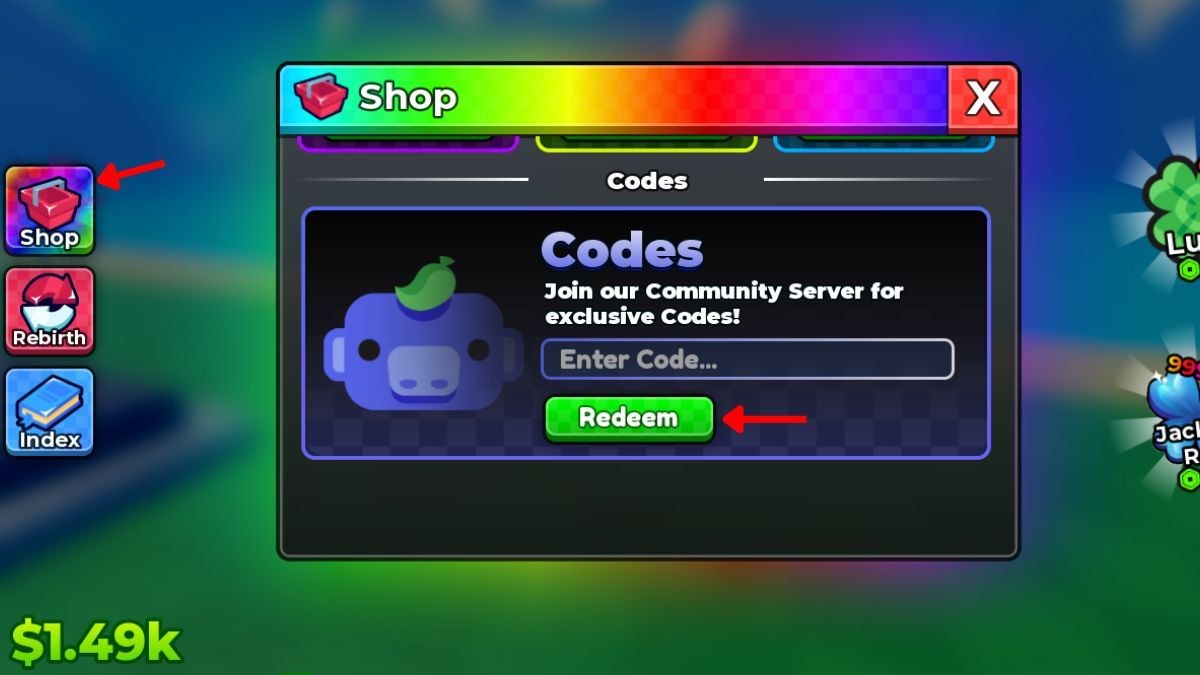
The redemption UI in Anime Dice is easy to miss on a phone. Shop sits in a slim left stack, the Codes field is at the bottom of a rainbow window, and the green Redeem button is smaller than the crate icon above it. This page is the click map. For the live strings themselves, stay on the codes hub. For what Lucky Spins, Trait Rerolls, and Gems actually change, read code rewards.
You do not need Roblox Premium to redeem. You do need a loaded plot — wait until cash appears in the lower-left HUD ($1.49k on a typical early plot) so the left icons are interactable. Redeeming during the first spawn animation sometimes eats the tap.
Desktop and mobile click path
- Join Anime Dice from Roblox. Shared servers cap at nine players; your plot is still private income.
- Look at the left edge. Three stacked buttons: Shop (gift crate), Rebirth (loop arrows), Index (book). Shop is the top icon.
- Open Shop. The header is a rainbow gradient with a crate and a red X. Tabs sit under that header; Codes is the labelled middle strip.
- Read the prompt: Join our Community Server for exclusive Codes! That is the Discord callout, not a second text box.
- Click Enter Code…, paste
UPDATE2, and press Redeem. Wait for the grant popup before you paste the next string. - Repeat for
UPDATE1andRELEASE. Order does not matter. Each code is once per account, not once per plot reset.
On mobile, rotate to landscape if the Codes field hides under the on-screen keyboard. Tap Redeem before you dismiss the keyboard or the field may clear.
What the rest of the HUD is doing
While Shop is open you will still see the right-side luck widgets (clover Lucky and a blue jackpot-style badge) and your cash. Those widgets are not the code box. Players sometimes tap Lucky looking for a promo field. Lucky is a luck product; codes live only inside Shop.
Rebirth and Index are the other two left buttons. Rebirth is covered in the rebirth guide. Index is the collection log on index and collection. Neither window accepts promo strings.
When a code fails
Work the list in order before you assume the string is dead:
- Typo. UPDATE2 has no spaces. RELEASE is not RELASE. Paste, do not retype on a phone.
- Already redeemed. Codes are one-time. A second tap on the same account will fail even if the hub still lists the string as active.
- Stale server. Update 2 shipped around 2 September 2026. If your client title still shows an older banner, rejoin from the Roblox game page.
- Expired. Launch codes can vanish when a later numbered update lands. Check the codes hub date line.
- Inventory delay. Rarely the popup lags. Look at Lucky Spin / reroll counts before you redeem again.
If every live code fails at once, that is a Shop outage, not your account. Hop servers and try a single string. Do not spray random YouTube codes from other dice games — Roll an Anime strings will not redeem here.
After the grants land
Open your currencies and decide spend order. The upgrade priority page recommends: cheap dice luck → Lucky Spins on a full plot → Trait Rerolls on keepers → Gems on Grade. If you are still in the first ten minutes, finish getting started before you burn Lucky Spins on an empty pad layout.
Alts need the same three codes. Use the codes checklist so you do not skip RELEASE on a second account. Rebirth does not refresh codes; the grant is bound to the Roblox user.
Exclusive Discord codes
The Shop copy is honest: extra strings often sit in the More & More Games Discord rather than in UPDATE-style names. Join from official links, read announcement channels, and paste those strings the same way. We only list codes that have already been posted publicly on this wiki so we do not leak unannounced rewards.
Once Shop is muscle memory, you can treat this page as a recovery guide and live on the codes hub for the table. Pair redemption with the lucky spins article so the free rolls happen after dice luck, not before.
Frequently Asked Questions
Quick answers to the most common questions.
Where is the Anime Dice code box?
Left-side Shop → Codes tab → Enter Code... at the bottom of the rainbow window. Redeem is the green button under the field.
Can I redeem codes after a rebirth?
Yes if you have not used them yet. Rebirth does not restock a code you already claimed. Grants stay on the account.
Why does Redeem do nothing on mobile?
The keyboard often covers the button. Dismiss it slightly, tap Redeem, and wait for the grant popup before pasting the next code.
Do I need to join the group to redeem UPDATE2?
No. UPDATE2, UPDATE1, and RELEASE redeem without the group. Joining still helps you see future strings faster via official links.